Develop · Group orders
One form for the whole group.
When one person books for many, the details you need are with everyone else. Instead of collecting them by email, you share one link. Each person fills in their own details, and you get one TWICE Commerce order with a line for every person and their answers on it.
The problem
A group booking has one person who books and pays, and many people who use what is rented. The details you need for each of them — sizes, skill level, contact details — are with them, not with the person booking.
TWICE Commerce can hold a group order: one billing contact and a customer for each person, with their answers on their own line. What it doesn't have is a way to collect those answers from the group. So they arrive as a spreadsheet or a pile of emails, and someone types them in.
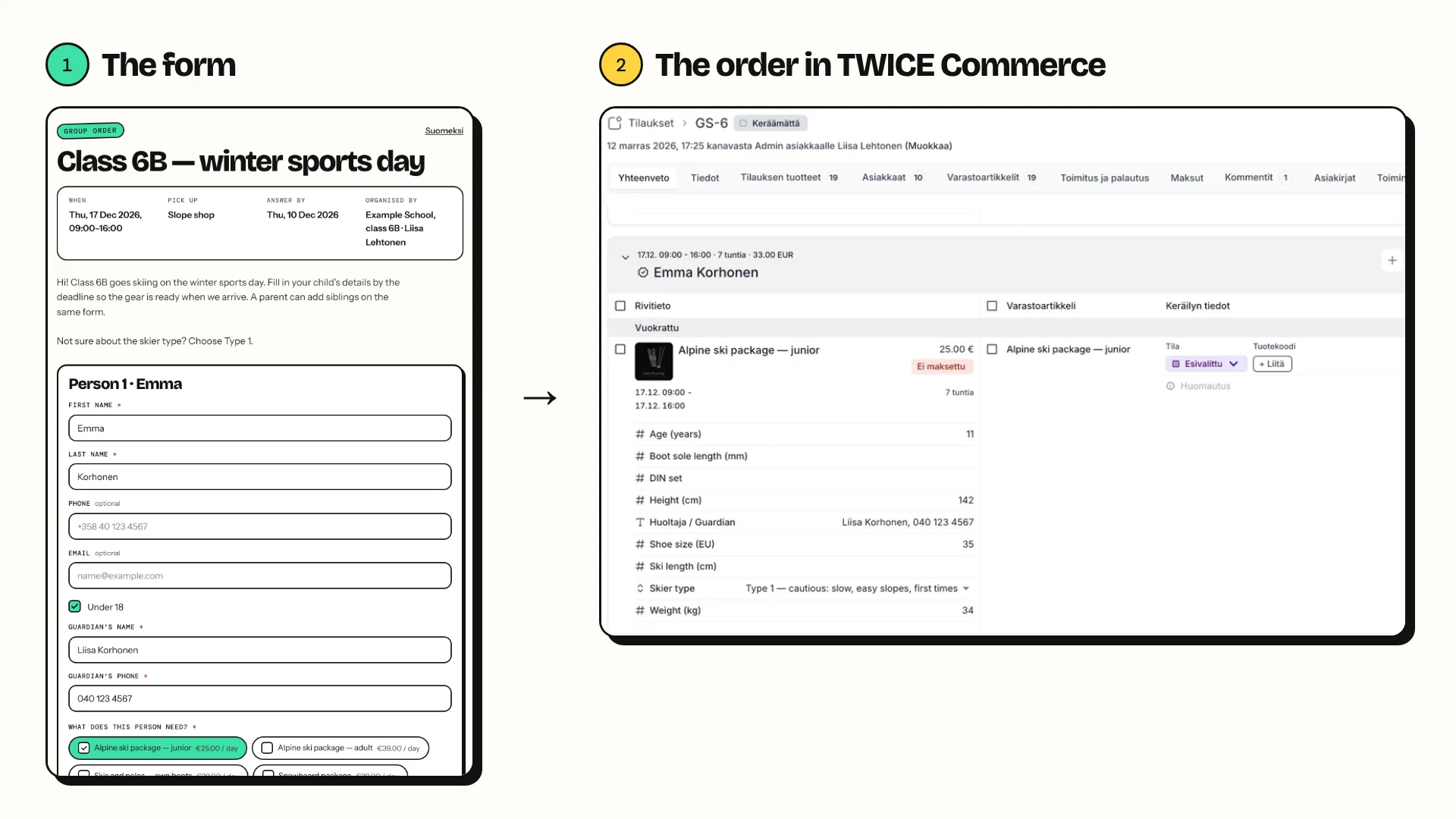
How it works
From one link to one order
- You create a form for the group: its name, a message in English and Finnish, the person who pays, the products they can choose from, the dates and the pick-up and return times.
- You share one link. It is private: it can't be guessed and search engines don't list it.
- Each person picks what they need and answers the questions for those products. The questions are the ones you have already set up on each product in TWICE Commerce.
- You choose whether the order is created when you press a button, or straight away with the first answer. Either way, answers that arrive or change later update the same order.
- The order has the organiser as the billing contact and every person as a customer with their own lines and answers. The organiser gets one payment link.
- One TWICE Commerce order for the whole group, with each person's answers on their own line — no typing.
- A printable prep sheet with everyone's answers, so the gear is ready before the group arrives. For ski rental it adds indicative DIN values and ski and board lengths.
- Settings per form: show prices or not; phone, email and a guardian for under-18s each hidden, optional or mandatory.
- Everything in English and Finnish — the form, your admin pages and the prep sheet.
- A list of every answer, a CSV export, and stock for the dates next to how many have chosen each product.
- For ski rental, the DIN values on the prep sheet are indicative, from the ISO 11088 table. The technician sets and checks the binding against the actual boot.
- TWICE Commerce translates a question's name but not the choices of a drop-down question. The Finnish choices are kept in the form's own settings.
- Answers are deleted 30 days after the rental. The order in TWICE Commerce stays as it is.
- The form is a small service outside TWICE Commerce that talks to your store. TWICE Commerce stays your shop: prices, stock, payments and orders.
What it costs
From 470 €, one-time.
Invoiced when the solution is live.
Optional hosting by us from €40/mo per solution. It covers fair-use traffic and API calls, fixes to our code (also when the TWICE Commerce API changes), and continuous tests and logs, so we catch errors and issues before you notice them.
New features are not included in the hosting price — we agree them case by case. Works great with Help (€99/mo).
Questions
Where do the questions come from?
From each product's checkout settings in TWICE Commerce — the same questions your online store asks. Change a question there and every form follows.
Can people change their answers?
Yes. Everyone gets their own link to edit their answers until the deadline. If the order already exists, it is updated too.
Who pays?
The person who booked gets one payment link for the whole group. Showing prices on the form is up to you.
What about people who answer late?
They are added to the same order. The admin tells you if the order changed after the payment link was made, so you can send a new one.
How fast can this be live?
Setup is usually 1–2 weeks.
Read more
Renting to groups?
Book a free 20-minute call and tell us which TWICE Commerce store it is for and what you rent.
Other add-ons
- Cold rentals Smart locks. Fully automated rentals — the lock code arrives with the booking. See how it works →
- Choose the exact unit Pick the exact one. Customers pick the exact unit they rent, not whichever one is free. See how it works →
- Subscribe-to-buy Subscribe-to-buy. A subscriber can buy the item they already use, minus what they have paid. See how it works →
- Gift cards Gift cards. Gift cards with a real balance that carries over. See how it works →
- Tickets Digital tickets. Sell entry like any other product, then check it at the door with a phone. See how it works →
- Discount codes Automatic discount codes. A thank-you code for the next visit, sent when the customer pays, picks up or returns. See how it works →
- Google Calendar Orders in your Google Calendar. Every order as an event in your Google Calendar. It moves when the order changes and disappears when it is cancelled. See how it works →