Develop · Google Calendar
Orders in your Google Calendar.
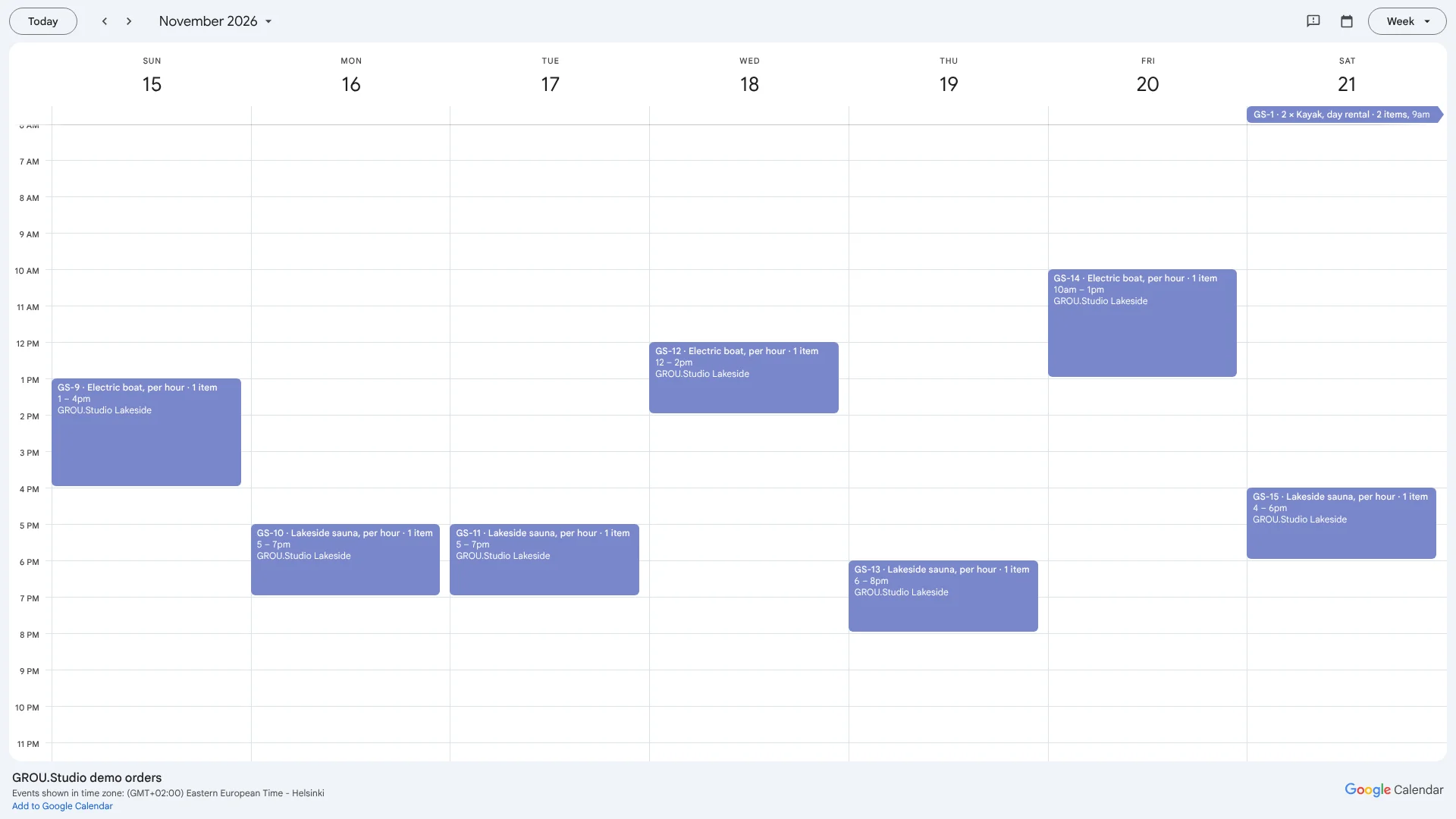
Your staff already live in Google Calendar on their phones. We put every TWICE Commerce order there as one event, and keep it right: a new order is added, a changed time moves the event, a cancelled order disappears. You choose what the event shows.
The problem
TWICE Commerce has its own order calendar in the admin. But the person opening the sauna or handing over the boat checks their phone, and on the phone it is Google Calendar.
Copying bookings over by hand works for a week. Then a customer moves their time, the copy is wrong, and someone waits at a locked door.
Where it fits
Where it fits
Saunas, rooms and spaces
Hourly bookings land as time blocks, so the day's plan is one look at the phone.
Boats, bikes and gear
See who picks up what and when. A day rental shows as a day, a two-hour rental as two hours.
Guides and instructors
Share the calendar with the person who runs the tour, so they see their bookings without a TWICE Commerce login.
Several staff
One calendar, shared with the team in Google. Read-only for most, editable for the few who need it.
How it works
From order to calendar
- In Google Calendar, you share one calendar with our robot address and choose Make changes to events. No Google login screens, nothing to install.
- You paste the calendar's ID on your settings page and press Test connection. A green Connected means it works.
- You choose which orders go in — all, or only paid — and what the event shows: order number, first item, item count, customer details, total, links back to the order.
- From then on every order arrives as an event within seconds. When the order changes in TWICE Commerce, the event follows. When it is cancelled or archived, the event is removed.
- One event per order, at the right times in your own time zone. Whole-day rentals show as whole days.
- Changed times move the event; cancelled, archived and deleted orders disappear on their own.
- A settings page: which orders, what the title says, what the description shows, language, colour.
- A preview: type an order number and see the event it gets, without writing anything.
- A link from each event straight to the order in TWICE Commerce.
- TWICE Commerce is the master. If you drag an event in Google Calendar, the order doesn't change, and the next change to the order puts the event back. Move bookings in TWICE Commerce.
- The robot sees only the one calendar you share with it, not the rest of your Google account.
- Some company Google accounts block sharing with outside addresses. A normal Google account works; with Workspace, your admin may need to allow it.
- The sync is a small service outside TWICE Commerce that talks to your store. TWICE Commerce stays your shop: prices, checkout, payments and orders.
What it costs
€40 a month.
Hosting only: no setup fee and no project. We connect your store, you share your calendar, and it runs right away.
It covers fair-use traffic and API calls, fixes to our code (also when the TWICE Commerce API changes), and continuous tests and logs, so we catch errors and issues before you notice them.
New features are not included in the hosting price — we agree them case by case. Works great with Help (€99/mo).
Questions
Can my staff see the calendar without a TWICE Commerce login?
Yes. Share the calendar with them in Google Calendar like any other calendar.
Does it work with Outlook or Apple Calendar?
The events live in Google Calendar. Outlook and Apple Calendar can subscribe to a Google calendar and show it read-only.
Will customer details be visible?
Only what you switch on. Name, email and phone are separate choices, for the title and the description.
What about old orders?
Saving the settings brings in every order that hasn't ended yet. Past orders stay out.
How fast can this be live?
Right away. We connect your TWICE Commerce store, and linking your calendar takes you about two minutes.
Read more
Want your orders in Google Calendar?
Book a free 20-minute call and tell us which TWICE Commerce store it is for and what you rent.
Other add-ons
- Cold rentals Smart locks. Fully automated rentals — the lock code arrives with the booking. See how it works →
- Choose the exact unit Pick the exact one. Customers pick the exact unit they rent, not whichever one is free. See how it works →
- Subscribe-to-buy Subscribe-to-buy. A subscriber can buy the item they already use, minus what they have paid. See how it works →
- Gift cards Gift cards. Gift cards with a real balance that carries over. See how it works →
- Tickets Digital tickets. Sell entry like any other product, then check it at the door with a phone. See how it works →
- Discount codes Automatic discount codes. A thank-you code for the next visit, sent when the customer pays, picks up or returns. See how it works →
- Group orders One form for the whole group. One link for the whole group. Everyone fills in their own details; you get one order with a line per person. See how it works →