Someone renting a storage unit doesn’t just want “4 m²”. They want the one near the entrance, the one on the ground floor, or the one next to their friend’s. An online store sells them a size, and somebody decides later which unit they actually get.
So they phone. They email. You move bookings around by hand, and the store you built to save time sends the work straight back to you.
In a storage hall, the unit is the product.
This tip covers how TWICE Commerce handles units, two ways to let customers choose without writing any code, and a floor plan where they pick the exact unit and subscribe in one go.
Why storage customers care which unit they get
In a bike rental, one bike of a size is as good as the next. In a storage hall, units of the same size are not the same:
- Distance: carrying boxes 50 metres is different from carrying them 5.
- Floor and access: ground floor or upstairs, a wide door or a narrow one.
- Neighbours: two family members who want units side by side.
- Habit: a returning customer wants the unit they had last year.
For a self-storage business, whether the hall is staffed or runs on access codes, those differences are the reason people call before they book. Let them see the hall and pick, and the call isn’t needed.
How TWICE Commerce picks a unit today
TWICE Commerce tracks every storage unit as its own stock item, with its own code (A1, A2, B7…). That’s the serialized model, and it’s the right one for storage.
What the customer buys is a Listing — “Storage unit M (4 m²)” — which describes the kind of unit it needs, not a specific one. When the order comes in, TWICE Commerce matches it to a free unit that fits. Connecting Listings to inventory explains how that match works.
The match is automatic: TWICE Commerce takes the first free unit that fits, and the item shows as Pre-assigned. Staff can change it by hand on the order, under Change stock item, where every unit is listed with whether it fits and whether it’s free.
So the system already knows exactly which unit each customer has. The customer just never gets to choose it.
Two ways to let customers choose without code
1. Ask at checkout, assign by hand
Add a checkout question to the Listing — “Which unit would you like?” — as a dropdown of unit codes. The answer lands on the order line, and staff assign that unit when they process the order.
Where it breaks: the customer can’t see which units are free, so they pick blind and you write back when their choice is taken. It’s a wish, not a reservation. A plain dropdown is also shown in one language only. And every order still needs a person.
2. One Listing per unit
Make a Listing for each unit — “Unit A1”, “Unit A2” — with a fulfilment rule that matches only that unit, for example by an attribute holding its code. Give all units of one size a shared price table so a price change happens in one place.
Where it breaks: a hall of 60 units becomes 60 products. The store turns into a long list of codes, with no picture of where anything is, which is the information the customer actually wanted.
Both work for a small hall. Neither shows the customer the hall.
A floor plan where the customer picks
The way that does show the hall is a floor plan, built next to TWICE Commerce. TWICE Commerce stays the system that knows which unit is free; the floor plan only shows it and passes the choice back.
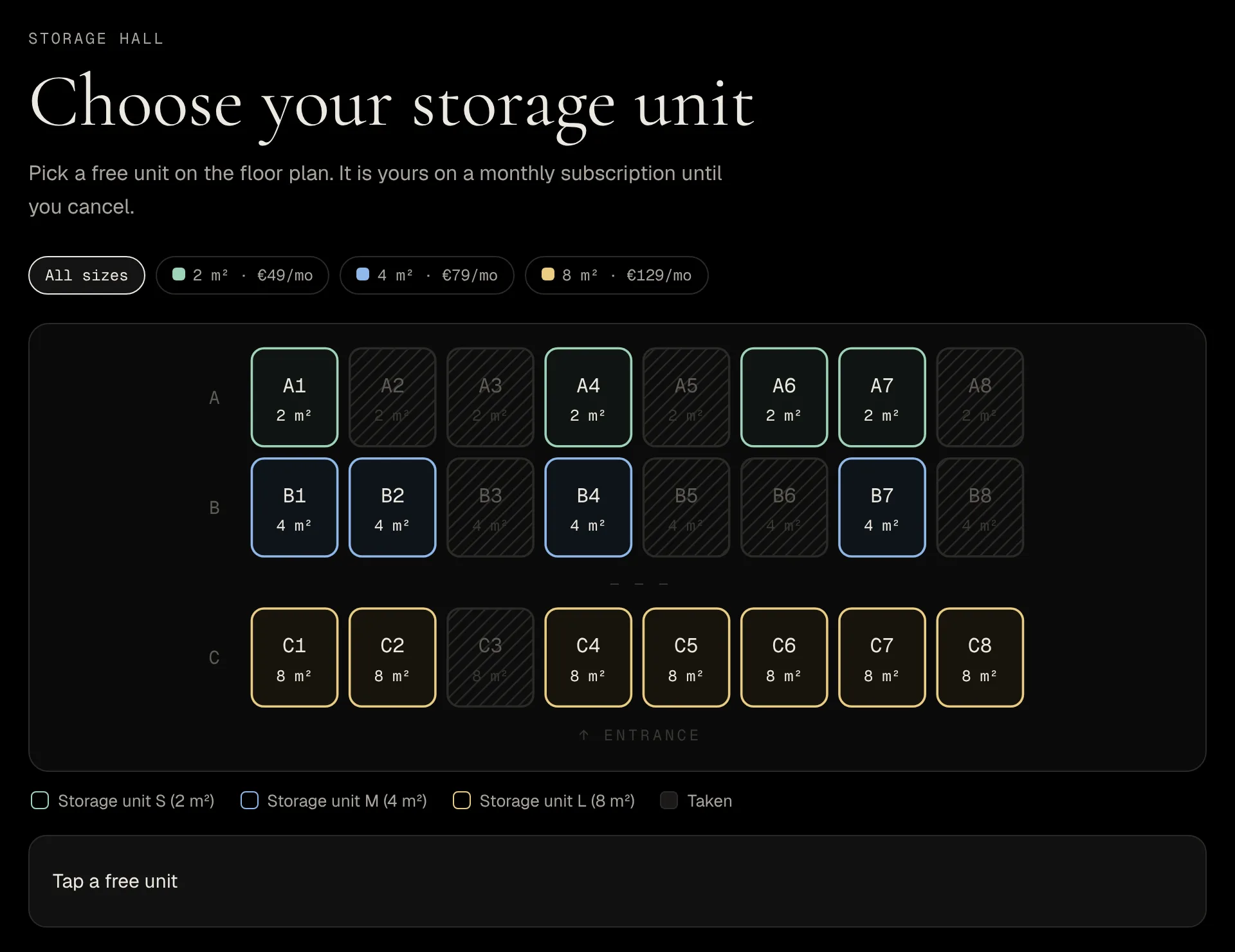
There are two ways to use it, and a store can offer both.
Choose first. A button on the Listing — TWICE Commerce calls these external links on a price table — opens the floor plan. The customer sees every unit with its size, monthly price and whether it’s free, picks one, and goes to the normal TWICE Commerce checkout. The order arrives with that exact unit on it. The unit is held for 30 minutes while the customer pays; if they don’t, the order is cleared and the unit is free again.
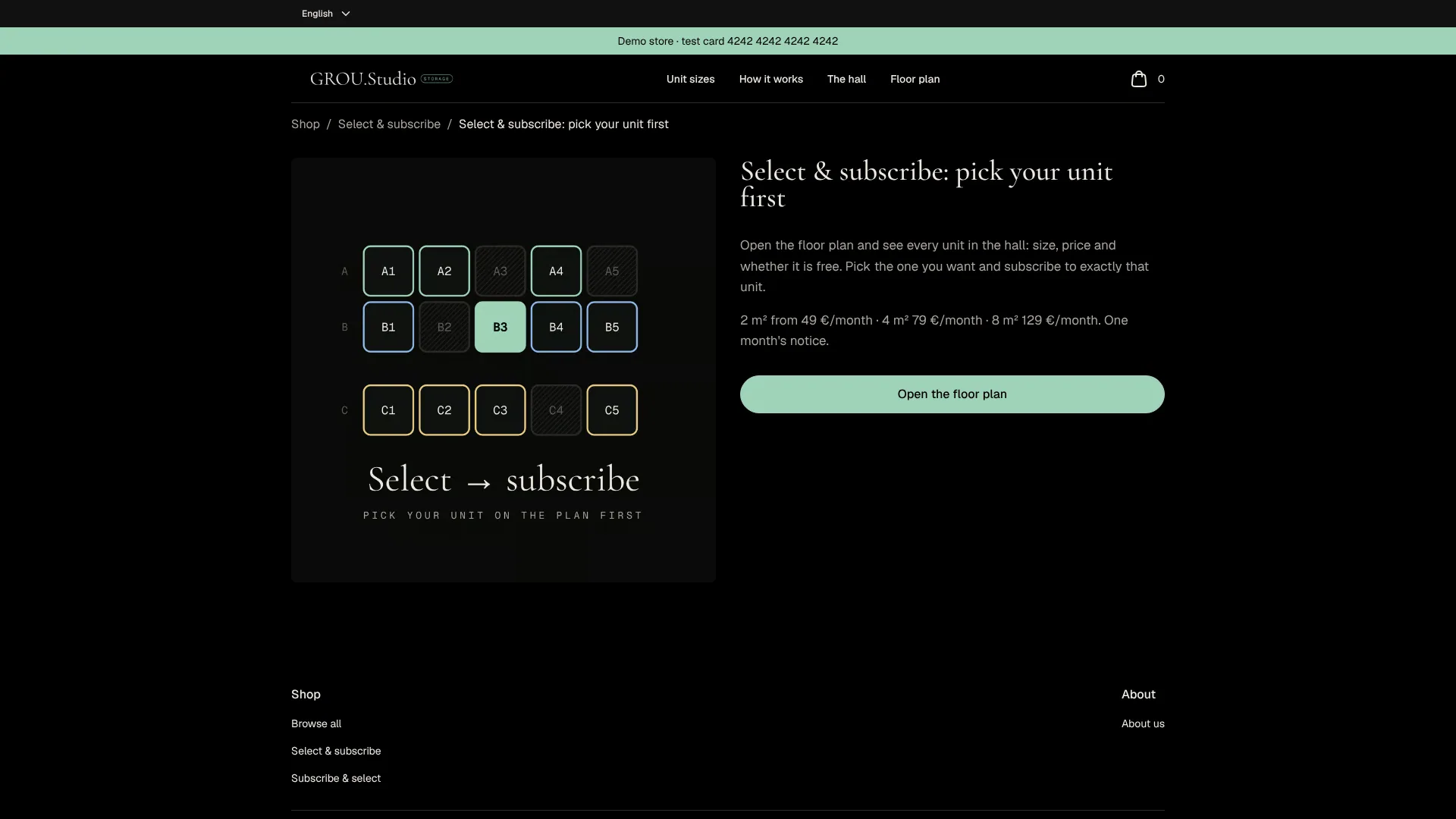
Order first. The customer buys a size as usual. They get an email with a link, open the floor plan, and pick their unit. They can change their mind until the choice locks, 24 hours before the start.
Either way:
- Only units that are truly free can be picked. If two people go for the same one, TWICE Commerce accepts the first and refuses the second, and the second customer is asked to choose again.
- Payment is a normal TWICE Commerce subscription: monthly, on the card the customer saves at checkout.
The part that trips people up: Pre-assigned is not a promise
Here’s the detail that matters once customers start choosing.
When TWICE Commerce picks a unit automatically, the item is Pre-assigned. In TWICE Commerce, Pre-assigned means movable: when staff assign a unit by hand to another order, they can pick a Pre-assigned unit, and TWICE Commerce moves the first order onto a different unit to make room. That’s useful while nobody cares which unit they get.
Once a customer has chosen, it’s a promise. If their unit stays Pre-assigned, a colleague fixing another order can quietly move them to the other end of the hall.
So a chosen unit has to move out of Pre-assigned. The demo saves the choice as Assigned, which TWICE Commerce does not move on its own, and when the choice window closes it moves the unit to a locked state of its own. If you let customers choose in any way — even the checkout-question workaround — make sure the unit ends up Assigned, not left as TWICE Commerce picked it.
Common mistakes
Selling sizes that don’t match the units
If “4 m²” covers units from 3.5 to 4.8 m², customers who picked by size will notice. Split sizes so a Listing’s units really are alike, or show the real size on the floor plan.
Letting the floor plan drift from the hall
The floor plan is built from your unit codes. When you renumber, split or close units, change the codes in TWICE Commerce at the same time, or the plan shows a hall that no longer exists.
Forgetting access
A self-storage business without staff on site needs a way in for each customer. That’s its own topic: unstaffed self-service rentals covers access codes and smart locks.
A few common questions
Can customers choose their own storage unit in TWICE Commerce? Not on a map out of the box. You can ask for a preferred unit at checkout and assign it by hand, or make one Listing per unit. A floor plan where customers pick a free unit is a custom solution next to TWICE Commerce.
What happens if two customers pick the same unit at once? Only one gets it. TWICE Commerce refuses the second booking, and that customer is asked to choose again.
Does it work with monthly subscriptions? Yes. The demo hall rents units on a monthly subscription, and the chosen unit goes on the subscription order.
Can staff still assign units? Yes. Staff assign units as before, and the customer sees the assigned unit as theirs.
Can the floor plan look like my own building? The demo draws a grid from unit codes (A1, A2…). A drawing of your own hall is the next step if you want one.
The One-Sentence Summary
If you remember one line:
In a storage hall the unit is the product — TWICE Commerce already knows which unit each customer has, and a floor plan lets the customer choose it themselves instead of phoning you.
We build floor plans like this for TWICE Commerce stores: storage halls, parking spots, boat berths, anything you rent by place. Try the demo hall and see how it feels from the customer’s side.