Flat pricing leaves money on the table. A week-long rental should cost less per day than a single day. A quiet spring is a chance to fill the calendar with a sale. The holidays are worth a premium. In TWICE Commerce you can build all three — and once they’re set, they run on their own, switching on and off by the calendar without you touching a thing.
The tool for it is the price table, and there’s really just one idea to hold:
Stack as many rate cards as you like. At checkout the engine charges the best price your rules make available — so your job is simply to decide what’s available, and when.
Get that, and tiers, discounts, and peaks all fall out of it.
Pricing lives on the Listing’s price tables
Open any Listing and go to the Pricing tab. A Listing has no price field of its own — pricing lives in one or more price tables attached to it. Every Listing starts with one default table (here it’s Rental) that’s always valid, and you stack dated tables on top for seasons and promotions.
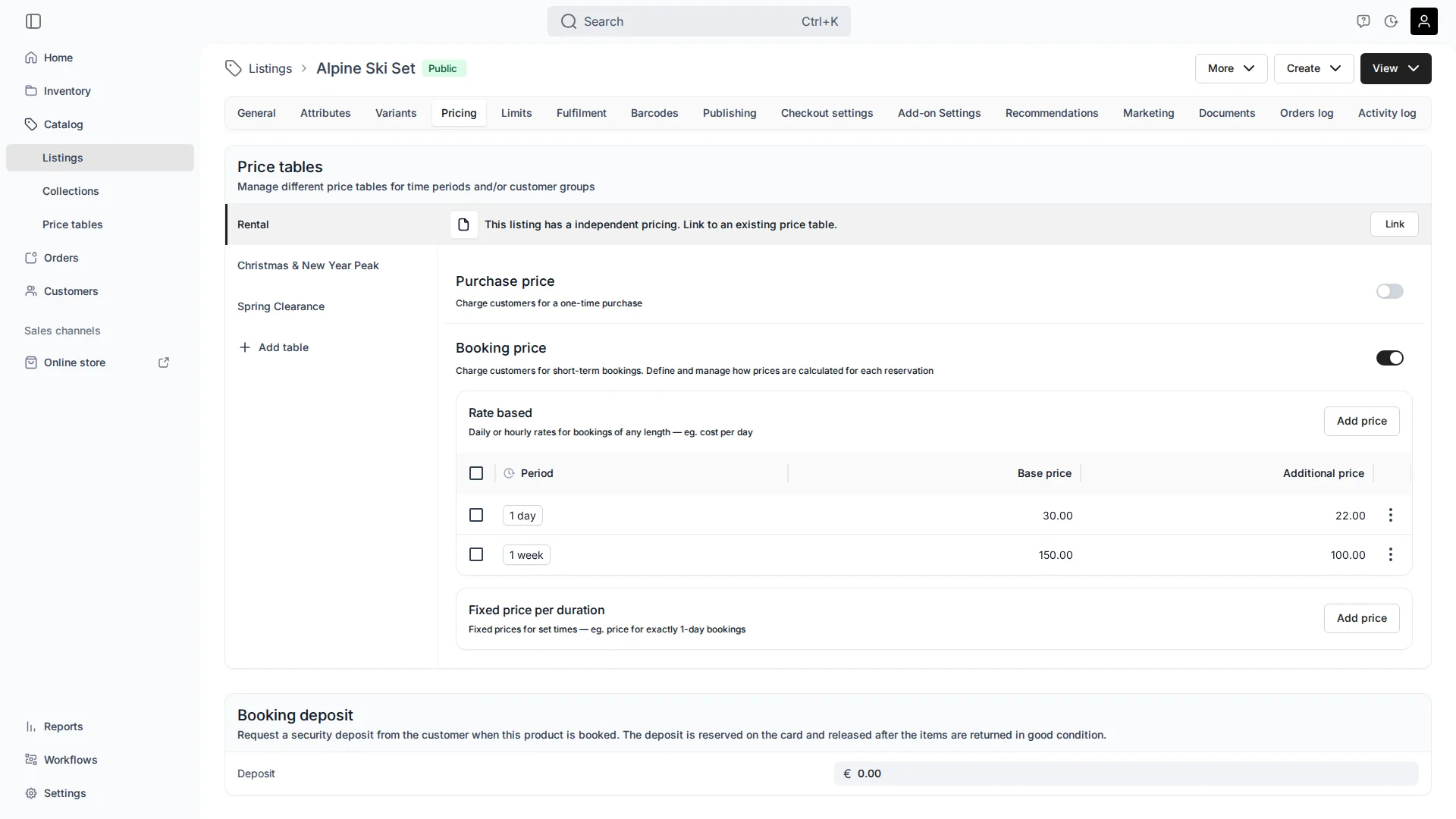
The ski set above already has three tables stacked up — an everyday rate, a holiday peak, and a spring sale. Let’s build each one.
Tiers: reward longer rentals automatically
The Rate based section prices by duration. Each row carries two numbers:
- Base price — the first block of that period.
- Additional price — each following block.
The Rental table has two tiers: 1 day at €30 / €22 and 1 week at €150 / €100. The engine assembles the best coverage of any booking automatically — longest blocks first, additional time filling the rest. A 9-day ski trip comes out as:
- 1 week (the longest block that fits): €150
- 2 extra days at the daily additional rate: €22 + €22 = €44
- Total: €194
The customer gets the weekly rate without choosing a “package,” and you set it once. One pair of rows quietly prices a day, a week, or anything between. (Prefer flat package prices? The Fixed price per duration option sets a single price for a set block — a Fri–Sun weekend, say.)
The one rule worth knowing
Everything else here is just this rule, used on purpose. At checkout TWICE Commerce gathers every row from every active table — the always-valid default plus any dated table whose window covers the booking — into one pool, and builds the cheapest valid coverage for the customer.
That’s a feature, not a footnote: the customer always gets the best price you’ve made available. You compose the menu of rates; the engine serves the friendliest one that fits. Discounts become effortless, and a premium becomes a deliberate, easy move. Here’s each.
Discounts that run themselves
Because the engine always reaches for the cheapest available rate, a discount needs nothing clever — add a dated table for the window, priced below the everyday rate, and you’re done.
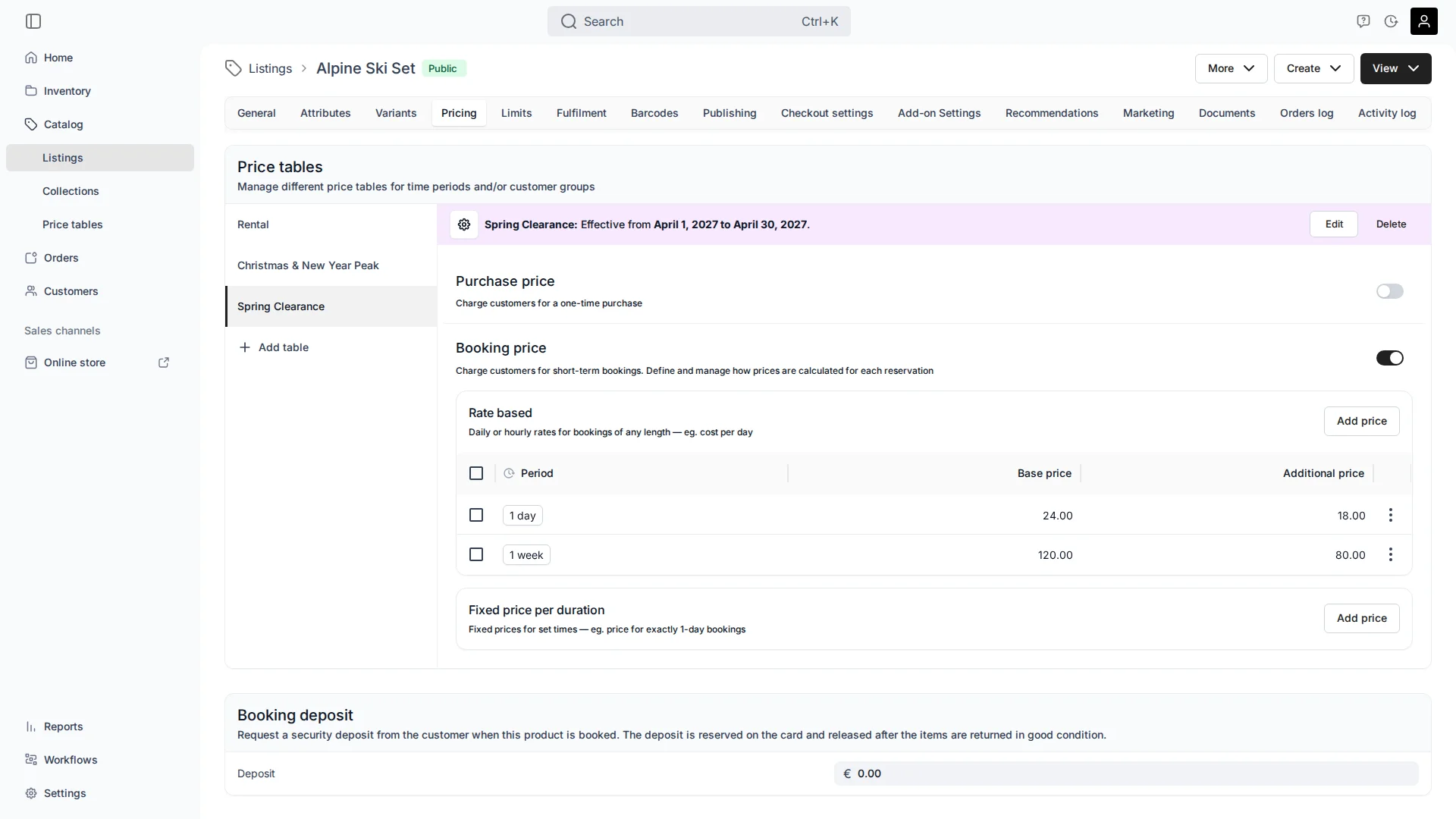
Spring Clearance runs 1–30 Apr 2027 at €24/€18 a day, €120/€80 a week. Through April those rows are the cheapest coverage, so they win; on 1 May the table simply goes quiet and bookings return to the everyday rate. Nobody flips a switch. A weekend promo is the same recipe in miniature — a short, cheaper dated table that turns itself off.
Charge a premium for your peak
Peaks are the mirror image, and just as deliberate. Skis are in hot demand over the Christmas holidays, so you give that window its own, higher rate card:
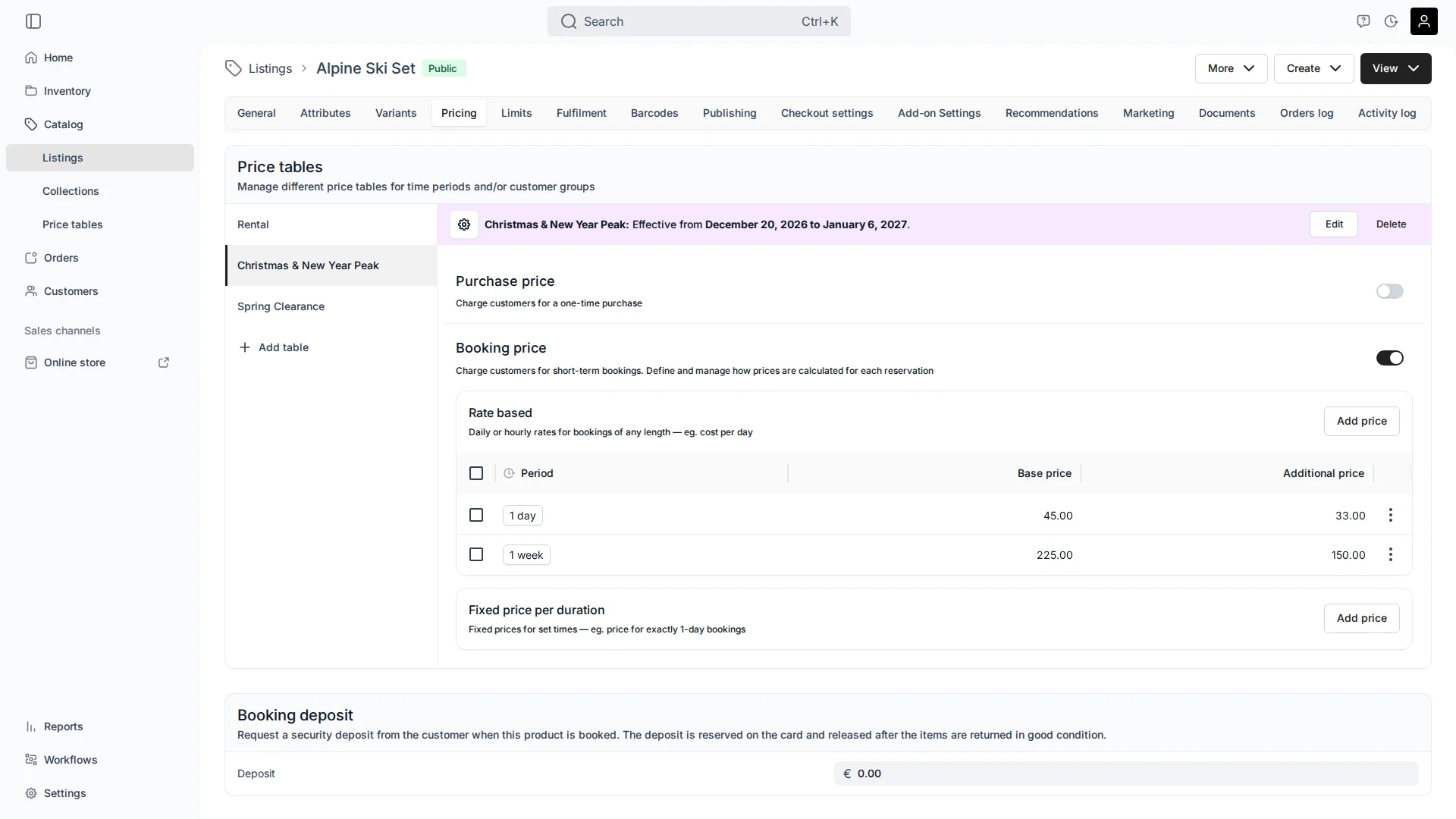
Christmas & New Year Peak runs 20 Dec – 6 Jan at €45/€33 a day. One thing to do on purpose: since the engine always serves the cheapest available rate, you make the peak rate the rate for those dates — clear the everyday rate out of that window (remove it, disable it, or scope its dates) so the premium is what’s on the menu. Discounts win by being cheaper; premiums win by being the only rate left covering the day. That’s the whole technique, and it’s the same instinct behind a higher weekend rate.
Edit without fear
Tune prices whenever you like — edits only ever touch future orders. Every booking captures its price at checkout, so anything already on the calendar keeps the price it was quoted. That’s what makes this safe to play with: stage next winter’s peak weeks ahead, run an experiment, nudge a rate — today’s bookings don’t budge.
(Two quick facts that keep things tidy: a dated table can’t be the default — only an always-valid table can, since the default has to cover every uncovered date — and there’s a fallback price for any slot no row reaches, with the cheapest applying if several do.)
One Listing, or the whole catalog
If the Listing has variants — a “Premium” ski, different lengths — you don’t rebuild a table per variant; you add a multiplier on the base row (1.2 adds 20%, 0.8 takes 20% off), and every variant re-prices when you change the base. And when a whole category should share a rate card, a single shared table re-prices all of them at once — its own follow-up tip. (Per-customer pricing isn’t a price-table job — that’s what discount codes are for.)
A few common questions
Does the customer always get the cheapest price? Among the rates you’ve made available for those dates, yes — the engine builds the cheapest valid coverage. You control which rates are on the menu.
How do I run a discount or weekend promo? Add a dated table over the window priced below the everyday rate. It wins because it’s cheaper and turns off on its own afterwards.
How do I charge more for a peak? Give the peak its own higher table, and make it the only rate covering those dates — clear the everyday rate from the window so the premium is what applies.
If I edit a table, do existing bookings change? No. Orders lock their price at checkout. Edits only affect bookings made afterwards.
Can a seasonal (dated) table be my default? No — only an always-valid table can be the default.
Where do per-variant differences live? On the price table, as a multiplier on the base row (1.2 = +20%, 0.8 = −20%).
Does any of this depend on how I track inventory? No — pricing sits on the Listing either way. Whether you track each unit individually is covered in Serialized or Pooled Inventory; for the Listing/SKU/Stock Item layers, see Listings, SKUs, and Stock Items.
The One-Sentence Summary
If you remember one line:
Stack a rate card for each tier, season, and promotion — the engine serves the customer the best one available, so a discount is a cheaper table and a premium is the only table left covering the day.
Designing this so it sings — which tiers to set, where seasons and peaks go, and when to share a card across the catalog — is one of the things we build together in a setup session, so your pricing earns its keep without you babysitting it.